
Do you ever find yourself writing a process that gets a bit complicated?
Uh, yeah. All the time, right?
I’m not talking about NASA flight checks. Frankly, if the process involves more than a straight, linear path, then it gets hard to keep in my head.
If you DO have an alligator, go on to Step 3. Otherwise, try dipping a toe in the water. Unless there are piranha. In that case, paddle.
For me, the easiest way to understand paths is to see a flow chart. I don’t put flow charts in my documentation, but I do create them for myself.
Flow charts save me time
Yes, it takes a little time to create a flow chart, but that time gets paid back when I can refer to it later. Otherwise, the phone rings and I lose my train of thought and can’t remember whether you insert the dongle before or after the amber light flashes.
Know what I mean?
And I’ve found that other people internally seem to appreciate them as well.
Flow charts let Dev check accuracy, not wording.
I send the flow chart to Dev and to product management before I even write a word. They can comment on it without getting tied up in whether this comma or that semicolon is in the right place. Of course, I send the finished work as well, but this way I can jump in a lot faster, knowing that I’ve got it right.
I use OmniGraffle, which is really great. But the truth is that I could use anything that allows me to make squares, circles, and lines. So anyone with a computer can make a flow chart.
Here’s a fairly simple one I created for myself when writing a little troubleshooting section for using an Internet phone.
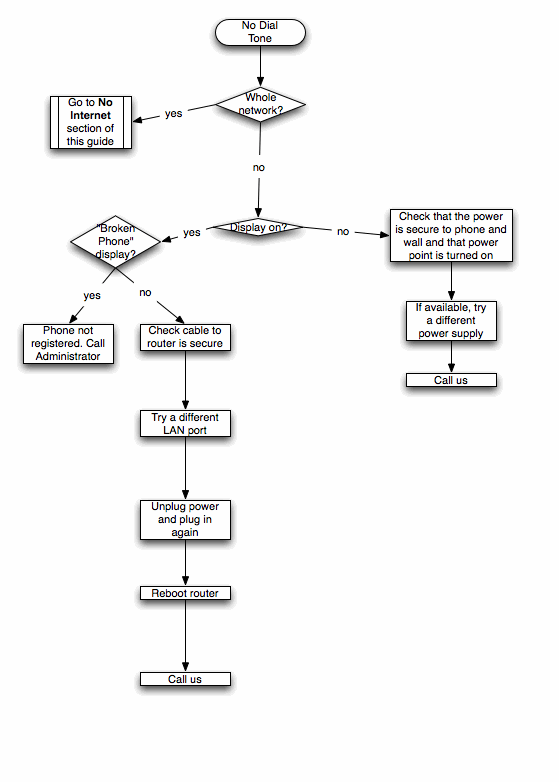
And here’s a draft of the writing itself, so you can see how the flow converts to steps.

Of course, there are a thousand ways to write a process, and I’m not claiming that my way is the best. But I will say that it would have been a lot harder if I didn’t have that handy little flow chart next to me. (By the way, extra points to whoever finds the typo in the first note.)
Do you use flow charts? If not, are you planning to give them a try?






Thanks for helping me understand that having a flow chart might take time, but it is a good reference for you later on. I guess technical writing would really have to use this strategy to make the best results or outcome for their project. I can imagine how helpful it would be if you seek help from a professional when you need to create a research paper or article that you need to pass in college or at work that has a deadline to meet.